Powertools for AWS Lambda (4) - Idempotency
Table of Contents
In real-world applications, functions can be computationally expensive or time-consuming. To improve efficiency, we can cache and reuse results for identical inputs, a pattern known as idempotency. AWS Lambda Powertools provides an idempotency utility that returns the previously successful result when a function is called repeatedly with the same input. In this post, we will explore how to use it.
The complete source code for this example is available in this GitHub repository.
#
Idempotency
The following example demonstrates how to instrument a Lambda function with the idempotency utility. The full implementation is available in lambda/app.py.
import json
import os

from aws_lambda_powertools.utilities.idempotency import (
    DynamoDBPersistenceLayer,
    IdempotencyConfig,
    idempotent_function,
)
from aws_lambda_powertools.utilities.idempotency.serialization.pydantic import (
    PydanticSerializer,
)
from aws_lambda_powertools.utilities.typing import LambdaContext
from utils import OrderDetails, OrderResponse
# ...

# A
dynamodb_persistence_store = DynamoDBPersistenceLayer(
    table_name=os.getenv("IDEMPOTENCY_TABLE_NAME")
)

# B
idempotency_config = IdempotencyConfig(
    event_key_jmespath="order_id",
)

# C
@idempotent_function(
    data_keyword_argument="order",
    persistence_store=dynamodb_persistence_store,
    config=idempotency_config,
    output_serializer=PydanticSerializer(model=OrderResponse),
)
def process_order(order: OrderDetails) -> OrderResponse:
    # Log execution to verify idempotency
    logger.info(f"Executing business logic for order {order.order_id}")

    total_cost = calculate_total_cost(amount=order.amount, price=order.price)
    return OrderResponse(...)

def lambda_handler(event: dict, context: LambdaContext) -> dict:
    # ...
##
A. Initializing the Persistence Layer
Powertools supports multiple persistence layers. In this example, we choose DynamoDB and initialize DynamoDBPersistenceLayer to store function results. This requires a DynamoDB table, which we provision via Terraform (see the Infrastructure section below).1
##
B. Configuring the Idempotency Key
We use IdempotencyConfig to define the uniqueness criteria. In this example, we configure it to extract order_id to serve as the idempotency key.2 Additionally, you can use expires_after_seconds to set a custom cache expiration (defaults to 1 hour).
##
C. Defining the Idempotent Function
The @idempotent_function decorator makes the process_order function idempotent.3 It accepts the following arguments:
data_keyword_argument: Specifies the function argument containing the payload.persistence_store: The persistence layer used for caching results (theDynamoDBPersistenceLayerinstance).config: The configuration for key extraction, as defined byIdempotencyConfig.output_serializer: Deserializes the cached JSON result back into a Pydantic model (OrderResponse), as the default behavior returns a dictionary.
#
Infrastructure for Idempotency
##
DynamoDB Table
The DynamoDB table is defined in terraform/dynamodb.tf. It uses id as the partition key and expiration as the Time to Live (TTL) attribute. Note that idempotency does not rely on DynamoDB’s TTL feature. The TTL attribute allows DynamoDB to automatically delete expired records, whereas Powertools checks the timestamp in the item to determine validity.
resource "aws_dynamodb_table" "order_idempotency_table" {
  name         = "OrderIdempotencyTable"
  billing_mode = "PAY_PER_REQUEST"
  hash_key     = "id"

  attribute {
    name = "id"
    type = "S"
  }

  ttl {
    attribute_name = "expiration"
    enabled        = true
  }
}
In terraform/lambda.tf, we pass the table name to the function as an environment variable.
resource "aws_lambda_function" "lambda" {
  #...
  environment {
    variables = {
      # ...
      IDEMPOTENCY_TABLE_NAME = aws_dynamodb_table.order_idempotency_table.name
    }
  }
}
##
Permissions
The Lambda function requires permissions to access DynamoDB.4 We define these in terraform/iam.tf.
# ...

resource "aws_iam_policy" "dynamodb_access" {
  name        = "lambda_dynamodb_access"
  description = "IAM policy for Lambda to access DynamoDB for Idempotency"

  policy = jsonencode({
    Version = "2012-10-17"
    Statement = [
      {
        Action = [
          "dynamodb:PutItem",
          "dynamodb:GetItem",
          "dynamodb:UpdateItem",
          "dynamodb:DeleteItem"
        ]
        Effect   = "Allow"
        Resource = aws_dynamodb_table.order_idempotency_table.arn
      },
    ]
  })
}

resource "aws_iam_role_policy_attachment" "lambda_dynamodb" {
  role       = aws_iam_role.lambda_execution_role.name
  policy_arn = aws_iam_policy.dynamodb_access.arn
}
##
Deploying and Testing
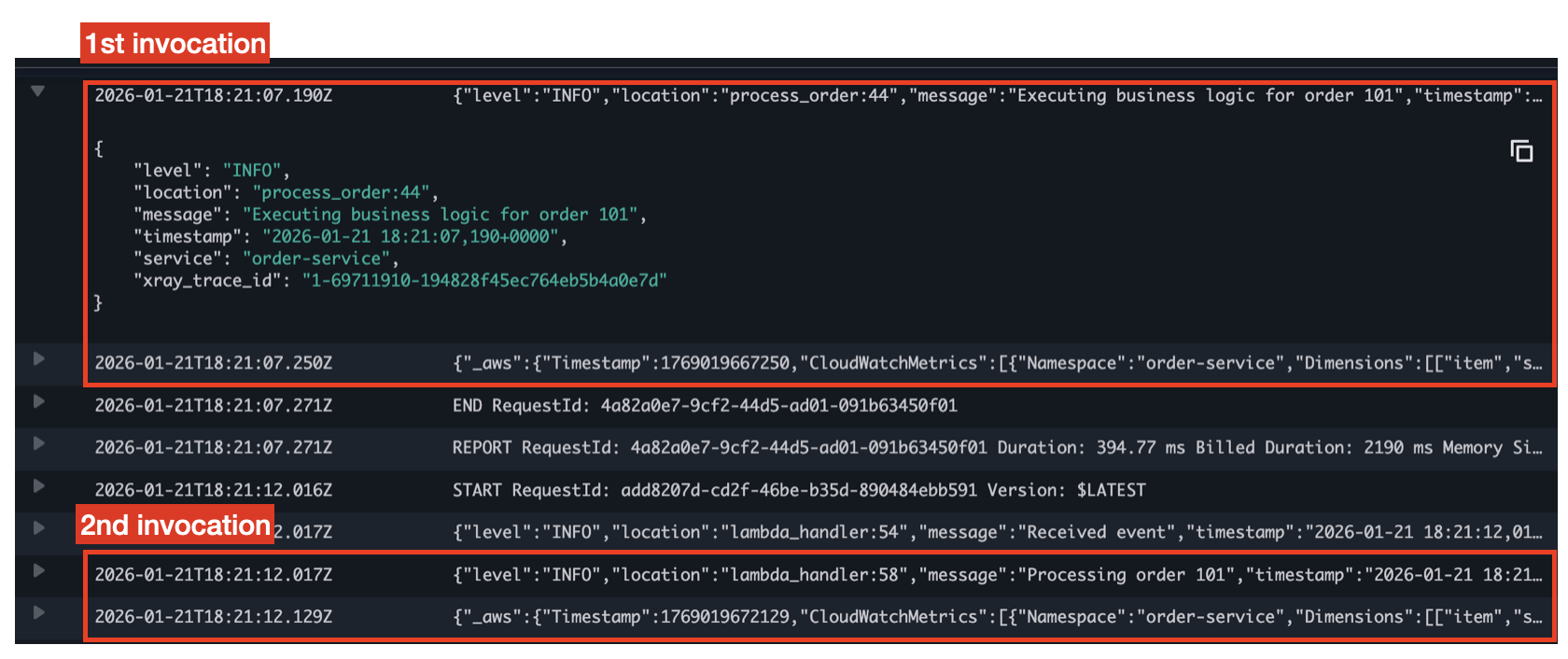
Deploy the function using the standard Terraform workflow (terraform init, terraform apply). After deployment, trigger the function twice with the following event. As mentioned above, records expire after one hour by default, so requests with the same order_id within this window will reuse the cached result.
{
  "order_id": "101",
  "item": "Coffee",
  "amount": 1,
  "price": 4.50
}
Navigate to the CloudWatch log group aws/lambda/lambda-powertools-idempotency.
The first invocation logs “Executing business logic for order”. The second invocation skips this logic and returns the result immediately, confirming that the idempotency utility is working.
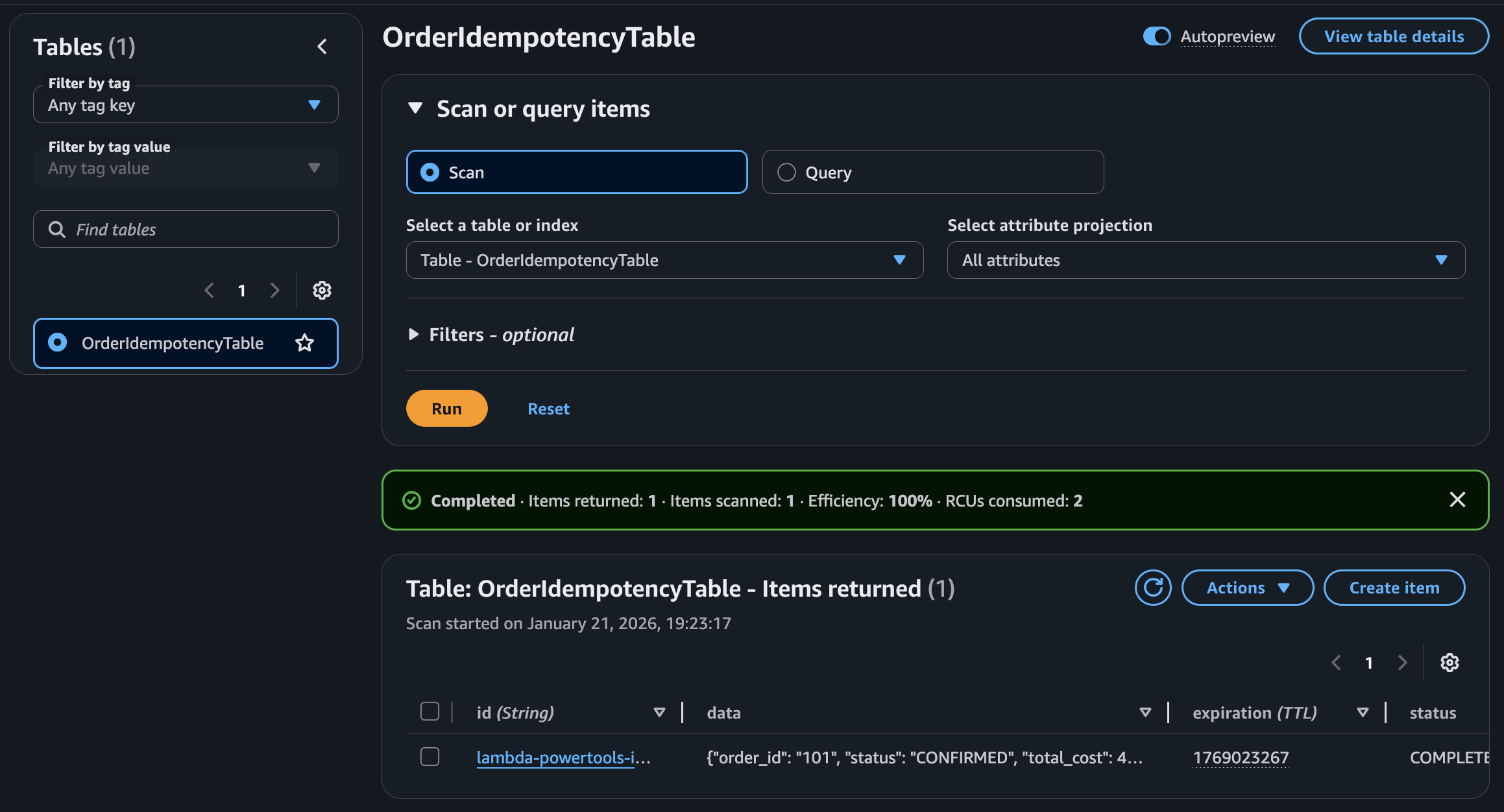
You can also view the cached record in the OrderIdempotencyTable DynamoDB table.
##
Cleaning Up
Remember to destroy the infrastructure to avoid incurring unnecessary costs.
#
Learn More
-
https://docs.aws.amazon.com/powertools/python/latest/utilities/idempotency/#dynamodb-table ↩︎
-
https://docs.aws.amazon.com/powertools/python/latest/utilities/idempotency/#choosing-a-payload-subset ↩︎
-
https://docs.aws.amazon.com/powertools/python/latest/utilities/idempotency/#idempotent_function-decorator ↩︎
-
https://docs.aws.amazon.com/powertools/python/latest/utilities/idempotency/#iam-permissions ↩︎